Proximity/Swipe Fobs
Proximity / swipe cards are supplied to new staff
at time of orientation. Level of access is
determined by an employee's position.
If level of access is required to be changed, then
the appropriate General Manager requests a change
of access from the Quality Systems Administrator.
Rosters
Rosters are normally done in fortnightly blocks
and are released 1 week prior to their start date.
Completed rosters will be sent to your email and
can be found on a clipboard above Nerida's desk,
as well as in the 'S Drive'.
S:\8. Darwin Tourist Facility\Admin\Staff
Information\Rosters & Timesheets
Shift Swapping
If staff want to swap shifts they must fill out a
shift swap form.
Forms are located with the spare timesheets above
the safe.
Shift swap forms should be completed as soon as
possible and must be signed off by a manager.
Availabilities
When availabilities change, let the manager know
as soon as possible.
The best way to do this is to send an email,
detailing the dates/days you would like to not be
rostered on. Ideally, this is sent before the next
roster is sent out.
Shifts and Timesheets
Timesheets are to be filled out after each
completed shift.
They are located above the safe in the red binder.
Spares are also located above the safe.
Shift times must be written in decimal format to 2
decimal places.
See the table below to see all available shifts
that may be rostered to you.
| Start |
End |
Break? |
Total Hours |
| 0845 |
1715 |
Yes |
8.50 |
| 0845 |
1615 |
Yes |
7.50 |
| 0845 |
1515 |
Yes |
6.50 |
| 0845 |
1345 |
Yes |
5.00 |
| 1215 |
1615 |
No |
4.00 |
| 1000 |
1400 |
No |
4.00 |
Working for less than 5 hours there is no break
entitlement. Working 5 hours or more, you are
entitled to a 20 minute paid break. If you want to
extend this break to 30 minutes, the last 10
minutes of the break will be unpaid and will have
to be deducted from the total shift time.
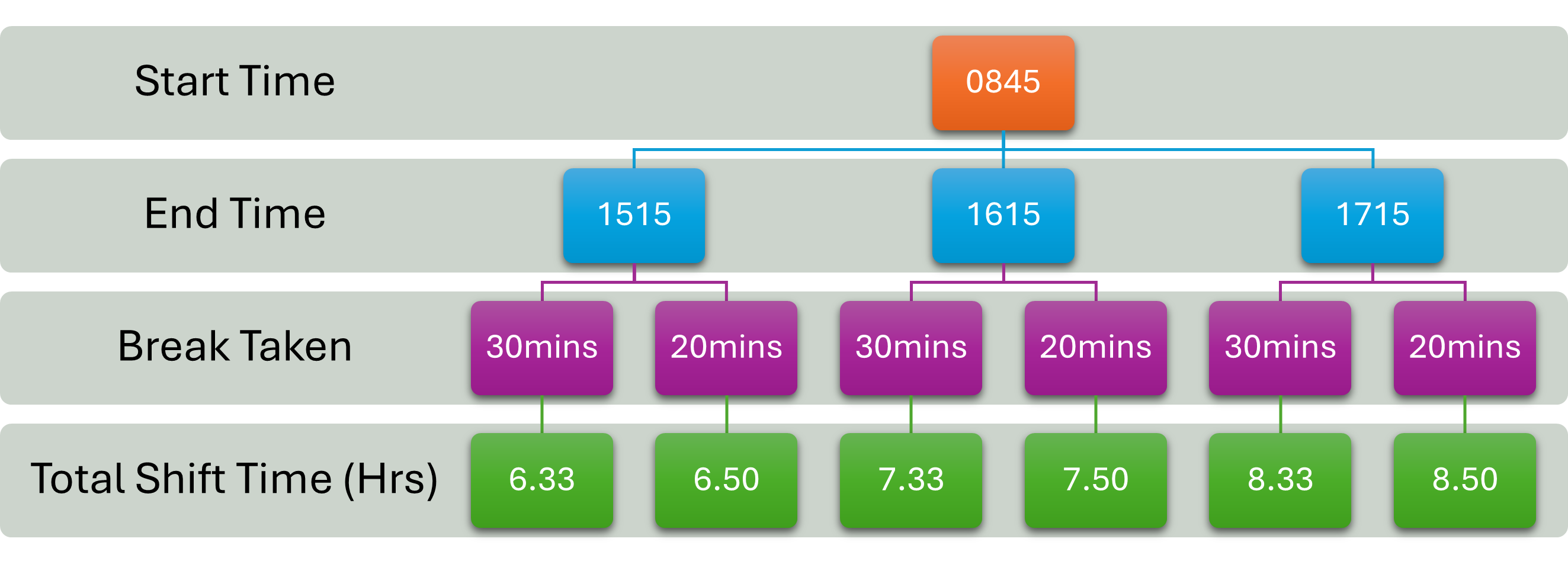
This flowchart diagram also shows how to work out
final shift times with breaks.
Facility Keys
S:\8. Darwin Tourist Facility\Admin\Registers\Key
box List.xlsx
All facility keys (Except master keys) can be
found in the key-box above the safe. There is a
key register in the 'S Drive'.
Master keys are kept in Nerida's locked top
drawer.
Passwords
S:\8. Darwin Tourist Facility\Admin\Registers\RFDS
Password & Account Database.xlsx
All passwords for software or online services are
located in a LOCEKD excel database.
Password is: Flyingdoctors1942
Visitor Sign In
If people come in to do maintenance or are here
for meetings and the like, they MUST sign in on
the visitor sign in book AND be given a visitor
lanyard.
Visitor sign in book can be found in the filing
cabinet or on the desk next to the customer guest
book.
Lanyards can be found on a hook underneath the
front desk telephone.
Uniforms
Will be handed to you on the first shift. If you
need more uniforms or different sizes, there are
spare uniforms in the cupboards behind the PC-12
Plane.
Let the supervisor/manager know if you need more
uniforms ordered in.